
How does your internet request reach Google?
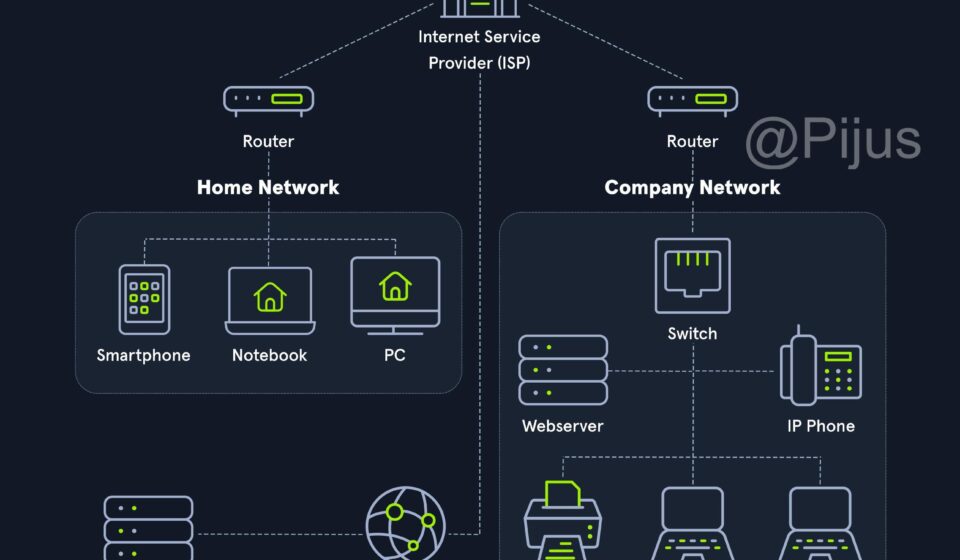
When you open Google, YouTube, Facebook, or another website on your phone, the data does not travel directly from your phone to the company’s server. It moves through several interconnected networks.
Understanding this journey makes it much easier to understand Wi-Fi, routers, ISPs, IP addresses, data centers, BGP, and Internet routing.
Step 1: Your Phone Connects to the Wi-Fi Router
Your phone first communicates wirelessly with your home Wi-Fi router.
For example:
Phone → Wi-Fi → Home Router
The Wi-Fi connection uses radio signals. Your phone and router exchange small units of data called packets.
Your router acts as the first gateway between your local network and the wider Internet.
Step 2: Your Router Connects to Your ISP
Your home router normally connects to your Internet Service Provider (ISP), such as Airtel, Jio, or another broadband provider.
The connection may use:
- Fiber optic cable
- Ethernet
- AirFiber or fixed wireless technology
- Other access technologies
So the basic path becomes:
Phone → Home Router → ISP Network
Your home router is only the first part of the journey. Large ISP networks contain many routers and other networking equipment.
Step 3: The ISP’s Network Routes Your Data
Once your request enters the ISP’s network, ISP routers determine where the packets should go next.
For example, if you request a YouTube video:
Phone → Home Router → ISP → Google/YouTube Network
The ISP does not necessarily send every request through one particular router. Modern networks have multiple routes and interconnected locations.
Step 4: How Does Google Connect to an ISP?
Google and an ISP such as Jio or Airtel can connect their networks through network interconnection.
This can involve:
- Direct peering
- Private network interconnections
- Internet Exchange Points (IXPs)
- Transit providers
- High-speed fiber infrastructure
This means Google’s network and the ISP’s network can exchange Internet traffic.
It is not necessarily:
Google Server → One Main Center → Jio
Instead, modern Internet infrastructure is distributed across many locations.
Step 5: Google’s Data Centers Are Connected
Google operates a large global infrastructure consisting of data centers, network locations, edge infrastructure, servers, and its own backbone network.
Different Google services and systems can communicate across this infrastructure.
A simplified model is:
Google Data Center → Google Network/Backbone → Interconnection → ISP Network
There is not one single “Google main server” through which every request must pass.
Step 6: Routers Don’t Store the Internet
A common misunderstanding is that routers contain Google’s, YouTube’s, or Facebook’s data.
They normally don’t.
A router’s primary job is to forward packets toward their destination.
Think of a router like a traffic junction:
It does not contain every destination; it helps decide which direction traffic should take.
Servers and storage systems are responsible for storing and processing application data.
Step 7: What Happens When You Watch YouTube?
Suppose you tap a YouTube video.
A simplified request path could look like:
Phone
↓
Home Wi-Fi Router
↓
ISP Network
↓
Internet Interconnection
↓
Google/YouTube Network
↓
Server or nearby cache/CDN
↓
Response travels back toward your phone
The exact route can vary.
In many cases, content may be delivered from a nearby CDN or edge location, rather than from a distant central server.
Step 8: Why Does the Response Come Back?
Your phone sends a request containing network information needed to deliver the traffic to the correct destination.
The destination system processes the request and sends data back.
The response can travel through:
Google/YouTube → Interconnected Networks → ISP → Home Router → Wi-Fi → Phone
Importantly, the return path does not have to be exactly identical to the path used by the outgoing packets.
Internet routing is dynamic.
Step 9: What Is BGP?
One of the most important technologies behind large-scale Internet routing is BGP (Border Gateway Protocol).
Different organizations operate their own networks, called autonomous systems.
BGP helps these networks exchange information about which IP address ranges are reachable through them.
In simplified form:
Network A:
“I can reach these IP networks.”
Network B:
“I can reach those IP networks.”
Routers use this routing information to determine suitable paths for Internet traffic.
This is one of the reasons the Internet can function as a huge collection of interconnected networks rather than one centrally controlled network.
Wi-Fi, SSID and BSSID: Where Do They Fit?
These terms belong mainly to the local wireless connection between your device and an access point.
SSID
SSID = Wi-Fi network name
Example:
MyHomeWiFi
BSSID
BSSID = identifier of a specific Wi-Fi access point, commonly represented by its MAC address.
Example:
AA:BB:CC:11:22:33
MAC Address
A MAC address identifies a network interface at the link layer.
Your phone’s Wi-Fi interface can have a MAC address, and a router’s Wi-Fi interface can have its own MAC address.
Therefore:
SSID ≠ BSSID ≠ your phone’s MAC address
They have different purposes.
Can Wi-Fi Help Estimate Location?
Yes, but this is different from Internet routing.
A phone can sometimes scan nearby Wi-Fi access points without actually connecting to them.
It may observe information such as:
SSID + BSSID + signal characteristics
Location systems can use Wi-Fi information together with other signals and databases to estimate an approximate location.
However, simply scanning a Wi-Fi network does not mean the router automatically receives the phone’s GPS coordinates.
Similarly, a router’s connection log and a Wi-Fi location database are two different things.
What Happens When You Disconnect From Wi-Fi?
When your phone disconnects from a Wi-Fi network, the router may retain connection logs depending on its configuration.
Such logs can potentially contain information such as:
- Device identifier or MAC address
- Connection time
- Disconnection time
- Network activity information
But a router cannot automatically follow your phone after it leaves its Wi-Fi coverage.
If your phone later connects to another Wi-Fi network, that other network may have its own connection records.
The Internet Is Not One Giant Computer
This is perhaps the most important idea to remember.
The Internet is a network of networks.
It includes:
- Home networks
- Mobile networks
- ISPs
- Enterprise networks
- Cloud networks
- Content providers
- Data centers
- Internet Exchange Points
- Backbone networks
- Transit networks
These networks cooperate through standardized networking technologies.
That is what allows your small home router to communicate with enormous services such as Google, YouTube, Facebook, and thousands of other online platforms.
The Complete Journey in One Diagram
📱 Phone
   ↓ Wi-Fi
📡 Home Router
   ↓
🌐 ISP Access Network
   ↓
🌐 ISP Core Routers
   ↓
🔗 Peering / Transit / Interconnection
   ↓
☁️ Google / Meta / Other Network
   ↓
🖥️ Server / Data Center / CDN
   ↓
🔁 Response
   ↓
🌐 ISP
   ↓
📡 Home Router
   ↓ Wi-Fi
📱 Phone
The Big Picture
Your phone does not directly “connect to Google” through one single cable.
Instead, your request travels through multiple interconnected networks, with routers forwarding packets toward their destinations.
That is the hidden infrastructure behind the simple action of opening a webpage or watching a video.
Your Wi-Fi router connects you to your ISP. Your ISP connects to other networks. Those networks connect to services such as Google through peering, private interconnection, Internet exchanges, or transit. Google’s distributed infrastructure then processes and delivers the requested data.
Understanding this journey gives students a practical foundation for learning Computer Networks, Internet Architecture, Cybersecurity, Cloud Computing, Networking, and Web Technologies.